PROJECT 02 / 생산성 · 활동 분석PROJECT 02 / Productivity · Activity Analysis
PC 사용 패턴을 분석하는 AI 생산성 도우미AI Productivity Assistant That Analyzes PC Usage Patterns
규칙·문자 인식·이미지 모델을 순서대로 적용해 PC 활동을 분류하고, 일일 리포트로 연결했습니다.Applied rules, text recognition, and an image model in sequence to classify PC activity and linked the results to a daily report.
01 문제 상황 Problem
앱을 얼마나 오래 켜 두었는지만으로는 실제 업무·학습과 주의가 분산된 시간을 구분하기 어렵습니다. 화면의 맥락과 입력 활동을 함께 분석해 사용자가 자신의 시간 사용 패턴을 이해하도록 돕고자 했습니다.How long an app stays open says little about whether the time was spent on actual work or study or on distractions. The project set out to analyze screen context together with input activity so users can understand how they spend their time.
02 사용 모델과 데이터 Models and Data
모델·기술Models · Techniques
- 규칙 기반 분류 → Tesseract OCR → CLIP ViT-B/32의 단계적 분석.Staged analysis: rule-based classification → Tesseract OCR → CLIP ViT-B/32.
- 앞 단계의 신뢰도가 낮을 때만 다음 분석을 실행해 백그라운드 연산 부담을 줄이는 구조입니다.The next analysis runs only when the previous stage's confidence is low, reducing the background computation load.
데이터·입력Data · Inputs
- 실행 중인 프로세스, 활성 창 제목, 키보드·마우스 입력 빈도, 화면 캡처.Running processes, active window titles, keyboard and mouse input frequency, and screen captures.
- 활동 분류 결과를 시간과 함께 JSONL 로그로 저장하며, 보고서에서는 화면 분석 후 캡처를 폐기하는 로컬 처리 방식을 설명합니다.Activity classifications are saved with timestamps as JSONL logs; the report describes a local processing approach in which screen captures are discarded after analysis.
03 구현 과정 Implementation
- 모니터링 모듈이 주기적으로 PC 사용 상태를 수집합니다.A monitoring module periodically collects PC usage status.
- 활동을 업무·학습·딴짓·자리 비움·미분류로 나누어 시간별 로그를 기록합니다.Classifies activity as work, study, distraction, away, or unclassified and records an hourly log.
- 활동 패턴에 따른 알림과 마스코트 피드백을 제공하고, 일일 사용 시간 및 집중도 리포트를 생성합니다.Provides notifications and mascot feedback based on activity patterns, and generates daily reports on usage time and focus.
04 핵심 결과 Key Results
- 활동 분류, 실시간 알림, 일일 리포트를 연결하는 프로그램을 구현했습니다.Implemented a program linking activity classification, real-time notifications, and daily reports.
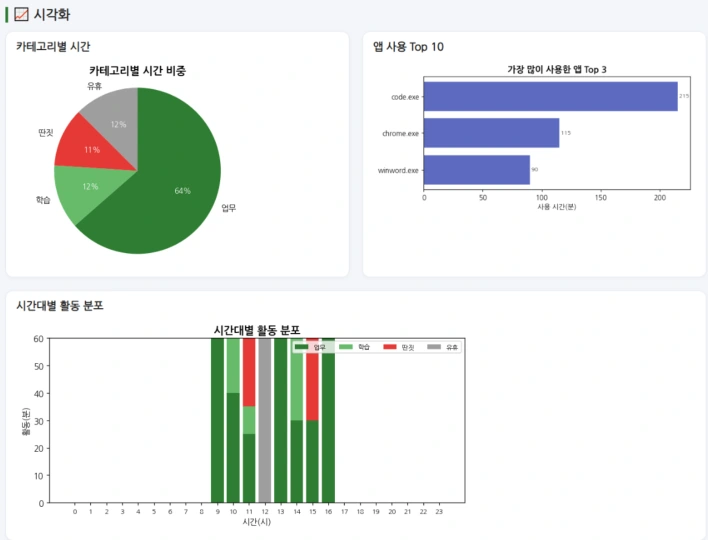
- 활동 비율, 앱별 사용 시간, 시간대별 분포를 시각화해 단순 사용 시간보다 구체적인 피드백을 제공합니다.Visualizes activity ratios, per-app usage time, and hourly distribution to provide more specific feedback than raw usage time.
05 한계와 발전 방향 Limitations and Next Steps
- 분류 정확도, 처리 지연, 생산성 향상에 대한 정량 실험은 보고서에 제시되지 않았습니다.The report does not present quantitative experiments on classification accuracy, processing latency, or productivity gains.
- 화면 내용이 같아도 사용 목적은 다를 수 있으므로, 활동 분류 결과를 실제 집중도의 직접적인 측정값으로 해석하기는 어렵습니다.Since the same screen content can serve different purposes, activity classification results are difficult to interpret as a direct measure of actual focus.
자료: 최종보고서. 제출 자료를 바탕으로 정리했으며, 결과는 해당 프로젝트의 구현·실험 범위에 해당합니다.Source: final report. Summarized from the submitted materials; results reflect the scope of the project's implementation and experiments.